
Apply for your visa with the TVSHelper app
Apply for 100+ visas, get your e-visa, or use our U.S. citizenship services — all from your phone. Upload documents, pay, and follow every request, with the same experienced team behind every application.

Scan with your phone camera
or download it from your store:


Free to download on iPhone and Android
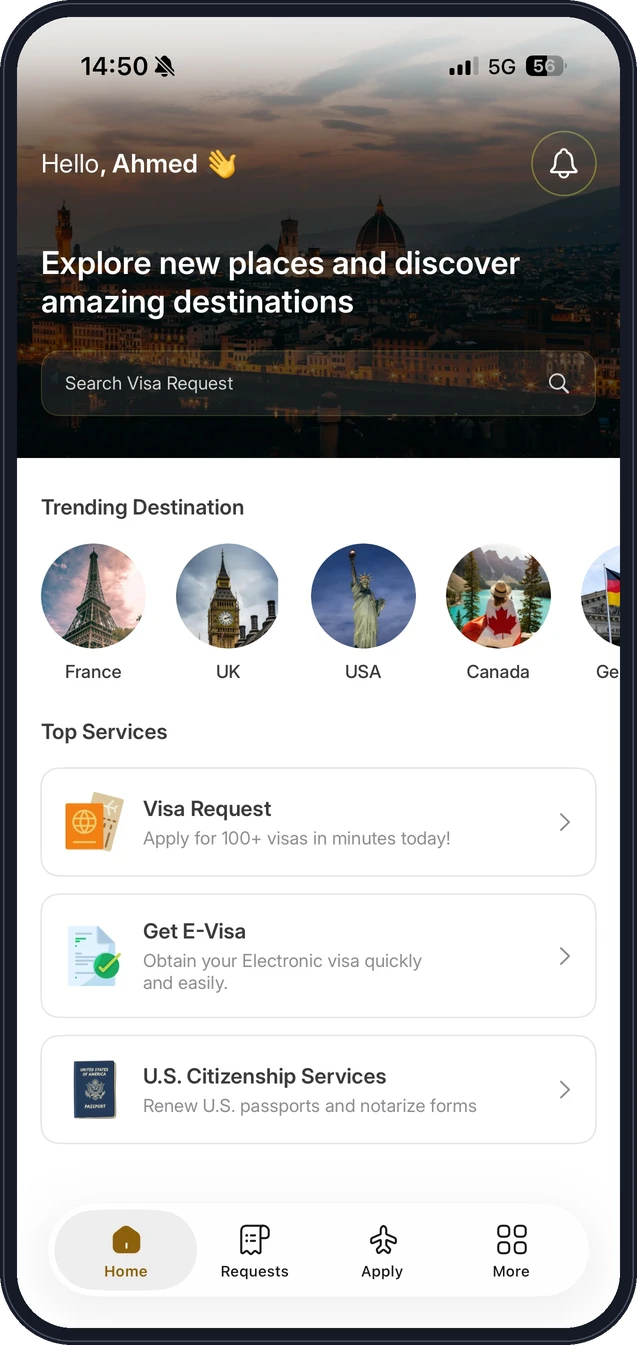
How it works in the app
Four steps from download to visa.
Download & sign up
Install TVSHelper and create your account in under a minute.
Choose your visa
Tap Apply and pick your destination — France, UK, USA, Canada and 100+ more — then choose your service.
Upload your documents
Snap or upload your documents. Our team reviews them against the embassy's latest requirements.
Track every step
Pay securely and follow everything from the Requests tab, with a notification at every step until your visa is ready.
Prefer to talk to someone first?
Our visa team is happy to answer questions before you apply.

Travel-Helper the leading visa agency in the Middle East and North Africa since 2016. Well-experienced staff with 15+ years